Chapter 1: Introduction to GitOps
What is GitOps
GitOps is a modern practice to managing infrastructure and application deployments using Git as the single source of truth. The four core principles of GitOps were introduced by OpenGitOps CNCF Sandbox organization, that maintains a set of open-source standards, best practices, and community-focused education to adopt GitOps approach.
The latest version of the principles can be found at opengitops.dev.
Below is an explanation of each principles, according to the v1.0.0 of the document.
Principle #1. Declarative
A system managed by GitOps must have its desired state expressed declaratively.
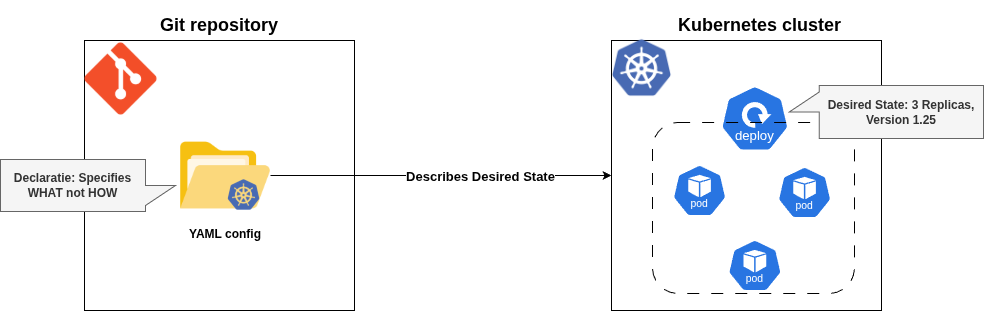
Meaning: The desired state of the system (e.g., infrastructure, applications, configurations) is described in a declarative manner, meaning you specify what the system should look like, not how to achieve it. This is typically done using configuration files (e.g., YAML, JSON) stored in a Git repository.
Implication: Instead of writing step-by-step scripts (imperative approach), you define the end state (e.g., “I want 3 replicas of this application running with this configuration”). The system figures out how to make it happen.
Example: A Kubernetes manifest file declaring a deployment with specific settings (replicas, container images, etc.) is declarative because it describes the desired outcome without specifying the steps to achieve it.
  apiVersion: apps/v1
  kind: Deployment
  metadata:
    name: my-app
    labels:
      app: my-app
  spec:
    replicas: 3
    selector:
      matchLabels:
        app: my-app
    template:
      metadata:
        labels:
          app: my-app
      spec:
        containers:
        - name: my-container
          image: nginx:1.25
          ports:
          - containerPort: 80
The provided sample Kubernetes deployment YAML file does not tell Kubernetes how to create or maintain these pods - Kubernetes takes care of the “how” behind the scenes.
Why it matters: Declarative systems are easier to reason about, reproduce, and audit since the configuration explicitly states the intent.
Principle #2. Versioned and Immutable
Desired state is stored in a way that enforces immutability, versioning and retains a complete version history.
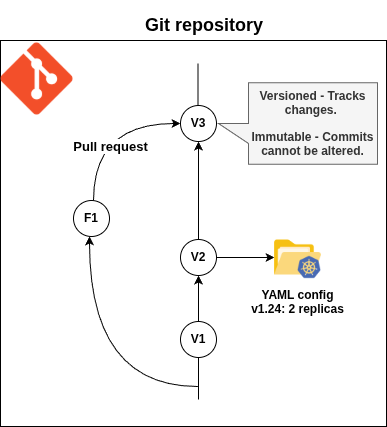
Meaning: The desired state of the system is stored in a Git repository (or similar version control system) where changes are tracked, versioned, and immutable. Once a change is committed, it cannot be altered without creating a new version, and the entire history of changes is preserved.
Implication: Every change to the system’s configuration is recorded as a Git commit, providing a clear audit trail. Immutability ensures that past states can be reliably reproduced or rolled back if needed.
Example: A configuration file in a Git repository is updated via a pull request, committed, and tagged. If a problem occurs, you can revert to a previous commit to restore the earlier state.
Why it matters: Versioning enables traceability, collaboration, and rollback capabilities, while immutability ensures configurations are tamper-proof and consistent.
Principle #3. Pulled Automatically
Software agents automatically pull the desired state declarations from the source.
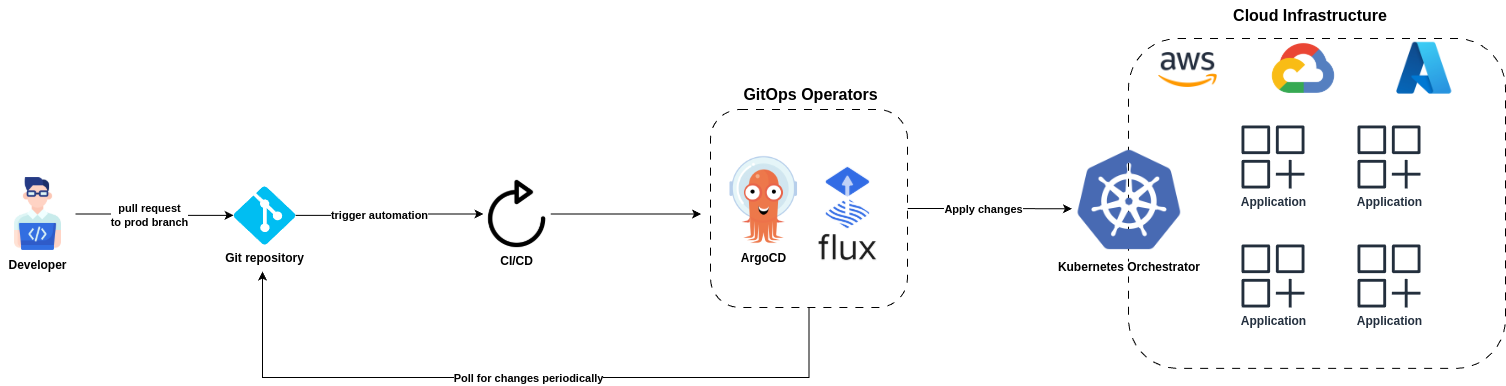
Meaning: Software agents (e.g., GitOps operators like ArgoCD or Flux) automatically retrieve the desired state declarations from the Git repository without manual intervention. These agents “pull” the configuration rather than having it “pushed” to them.
Implication: The system is self-managing to an extent, as the agents continuously monitor the Git repository for changes and apply them to the system. This eliminates the need for manual deployment commands or external orchestration tools pushing changes.
Example: An ArgoCD agent monitors a Git repository, detects a new commit with updated Kubernetes manifests, and applies them to the cluster automatically.
Why it matters: Automated pulling reduces human error, ensures consistency, and enables rapid deployment of changes as soon as they’re committed to Git.
Principle #4. Continuously Reconciled
Software agents continuously observe actual system state and attempt to apply the desired state.
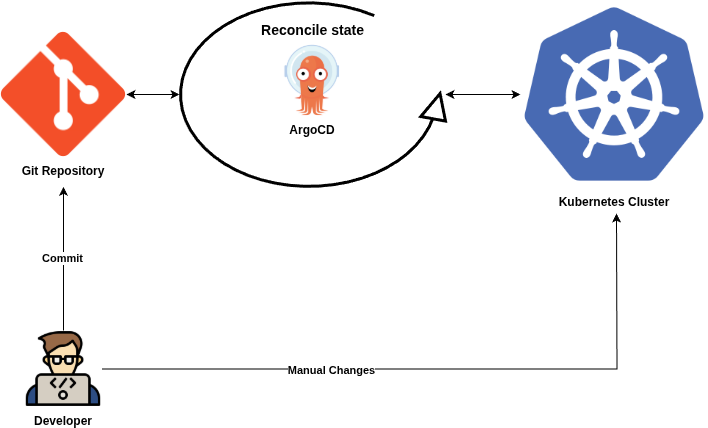
Meaning: Software agents continuously compare the actual state of the system (e.g., what’s running in production) with the desired state defined in the Git repository. If there’s a discrepancy (drift), the agents automatically take action to reconcile the system back to the desired state.
Implication: The system is self-healing, as the agents enforce the declared configuration. For example, if a pod is manually deleted, the agent will recreate it to match the desired state.
Example: If a Kubernetes cluster’s actual state diverges from the Git-defined state (e.g., due to a manual change or failure), the GitOps agent (like Flux) will detect the drift and reapply the correct configuration.
Why it matters: Continuous reconciliation ensures the system remains consistent with the declared intent, improving reliability and reducing manual maintenance.
Together, these principles make GitOps a powerful paradigm for managing infrastructure and applications:
- Declarative ensures clarity and simplicity in defining system states.
- Versioned and immutable provides auditability, reproducibility, and rollback capabilities.
- Pulled automatically enables automation and reduces manual intervention.
- Continuously reconciled ensures the system is always aligned with the desired state, enhancing reliability and self-healing.
By leveraging Git as the source of truth and automating the application of changes, GitOps streamlines operations, improves collaboration, and aligns with DevOps practices like CI/CD and infrastructure-as-code.
Tools in the GitOps Space
In the GitOps ecosystem there are two major competing tools:
Flux
Flux is an open-source tool originally created by Weaveworks (also coined the term “GitOps”) that keeps Kubernetes clusters in sync with configuration sources (like Git repositories). It is one of the two “heavyweights” in the GitOps world, alongside ArgoCD.
At it’s core Flux is a set of controllers for Kubernetes that automates the deployment of your infrastructure and applications. When you push a change to Git, Flux “sees” it and automatically applies that change to your cluster.
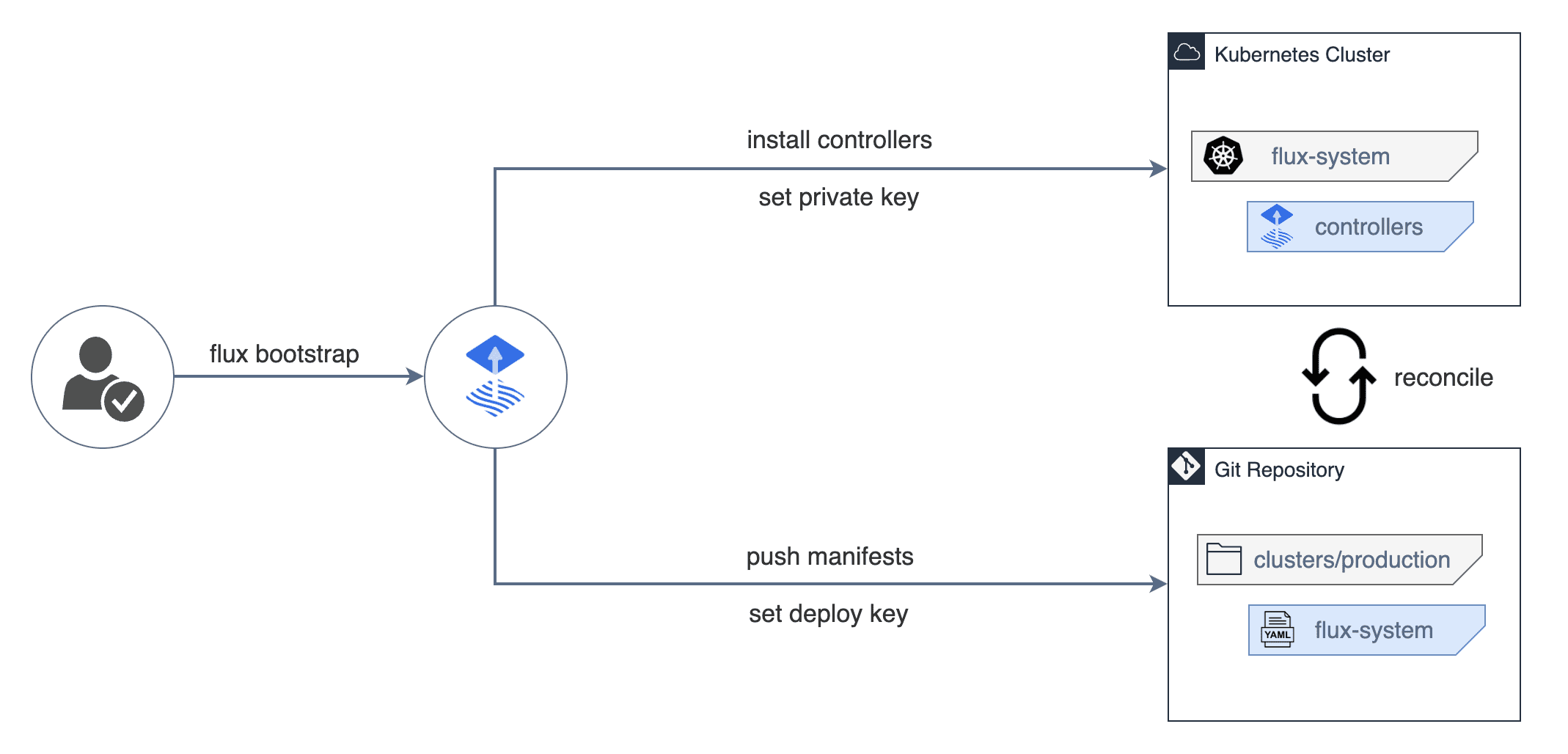 Image source: Official FluxCD Website
Key Features of Flux
- Automated Updates: It doesn’t just pull changes from Git; it can also scan your Container Registry for new images and automatically update your Git manifests to use the new version.
- Modular Design: It is built using the GitOps Toolkit, meaning it is composed of several small controllers (Source Controller, Kustomize Controller, Helm Controller, Notification Controller, Image reflector and automation controllers) rather than one giant “monolith” application.
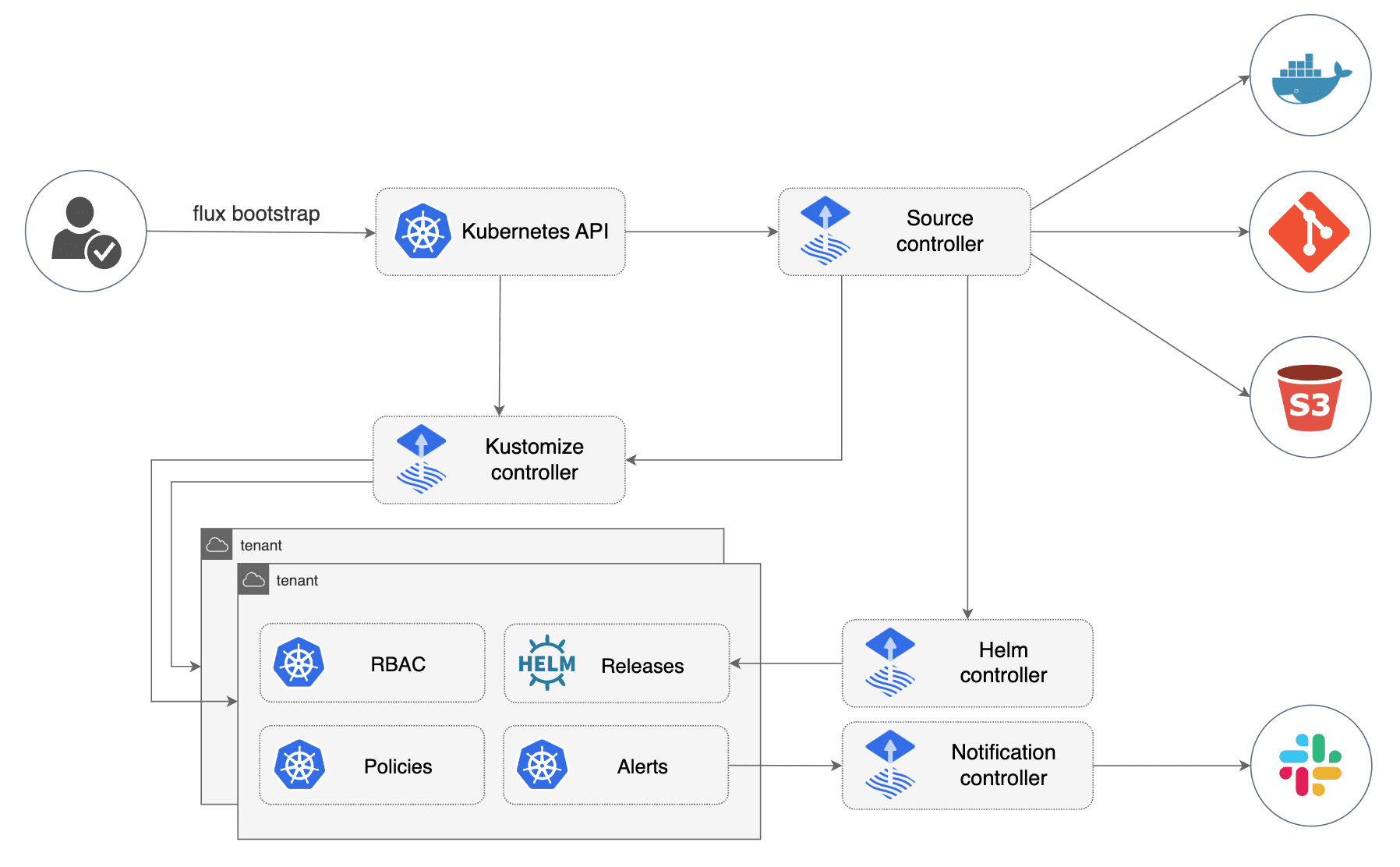 Image source: Official FluxCD Website
- New UI: Not so long ago Flux existed only as CLI-tool without any UI. On 27 February 2024 Flux announced a new general purpose UI.
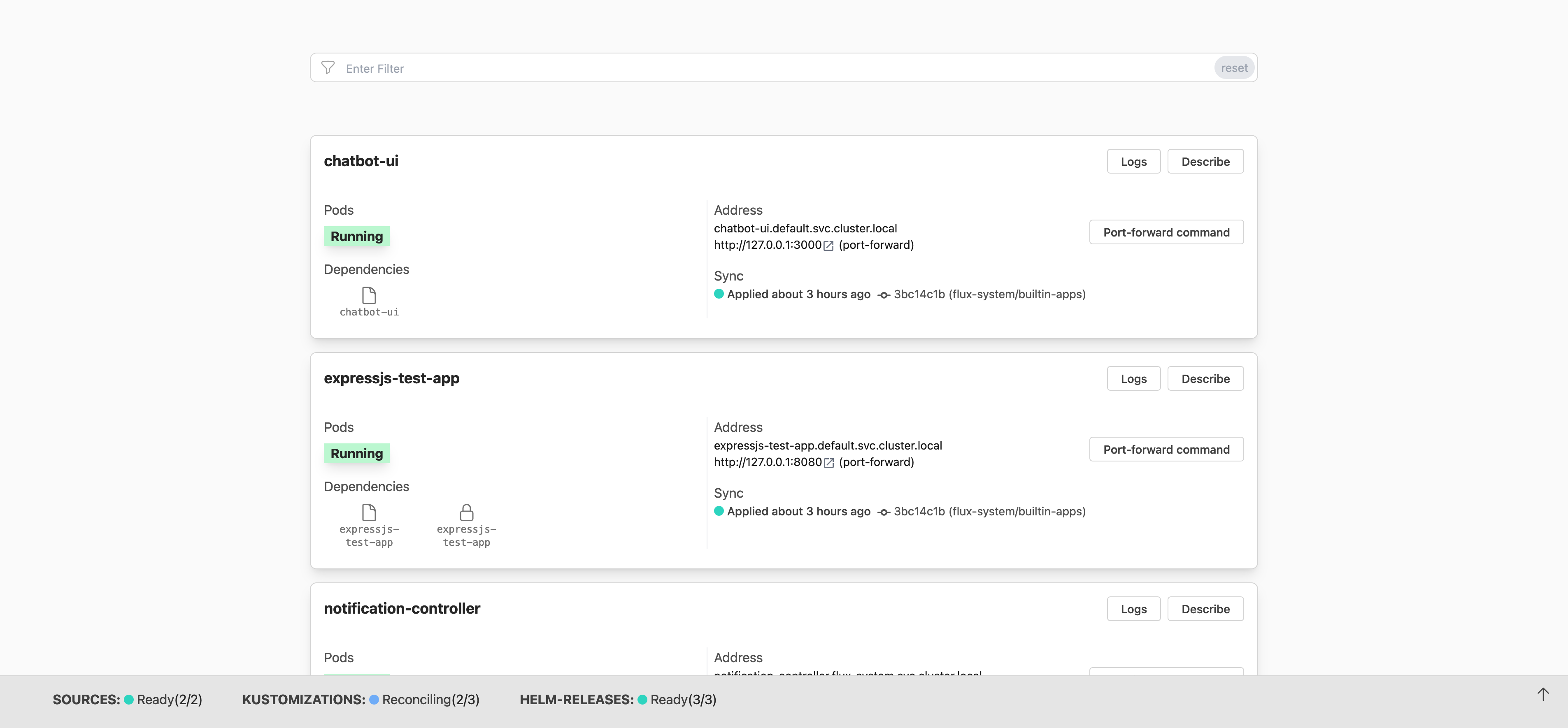 Image source: FluxCD Blog
You typically choose Flux if you prefer a “set it and forget it” approach where the cluster manages itself without needing a dashboard, or if you are running many small, resource-constrained clusters (like at the “Edge”) where a heavy UI isn’t practical.
ArgoCD
ArgoCD is an open-source declarative, GitOps continuous delivery tool for Kubernetes, created by Intuit in 2018 and donated to the CNCF (where it graduated in 2022). It is part of the broader Argo Project, which also includes Argo Workflows, Argo Events, and Argo Rollouts.
Unlike Flux’s operator-centric, modular philosophy, ArgoCD is built around a central concept: the Application — a Kubernetes CRD that maps a Git source to a target cluster and namespace. Everything you do in ArgoCD revolves around defining, syncing, and observing Applications.
Key Features of ArgoCD
- Rich Web UI (first-class citizen): Unlike Flux where the UI was an afterthought, ArgoCD was designed with a powerful UI from day one. It provides a real-time visual graph of your application’s resource tree — you can see deployments, pods, services, and their health status at a glance, all live-updating.
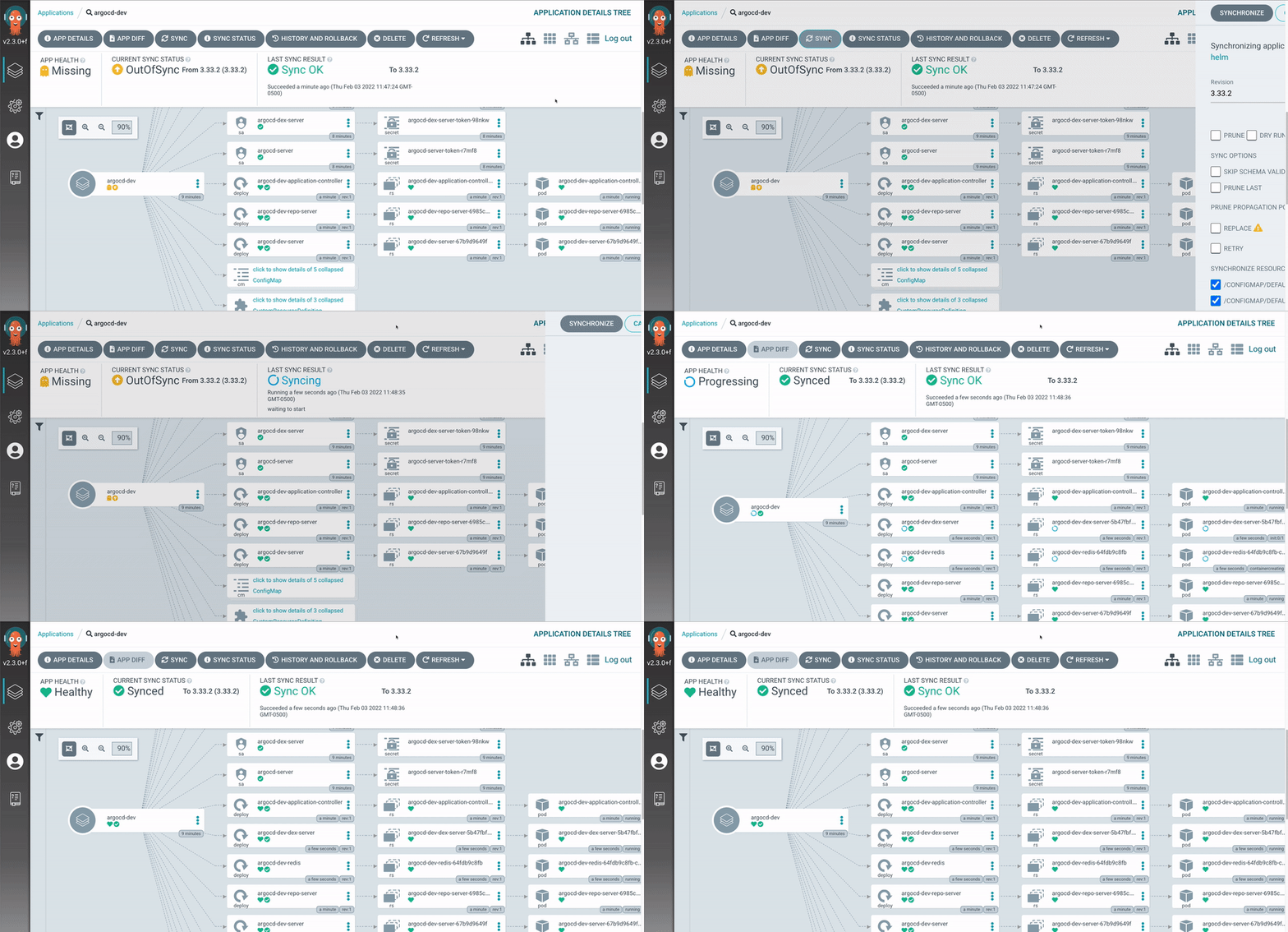 Image source: ArgoCD Official Website
- Multi-cluster Management: ArgoCD is built for managing many clusters from a single control plane. You register external clusters and deploy Applications to them centrally. This makes it a natural fit for platform teams operating at scale.
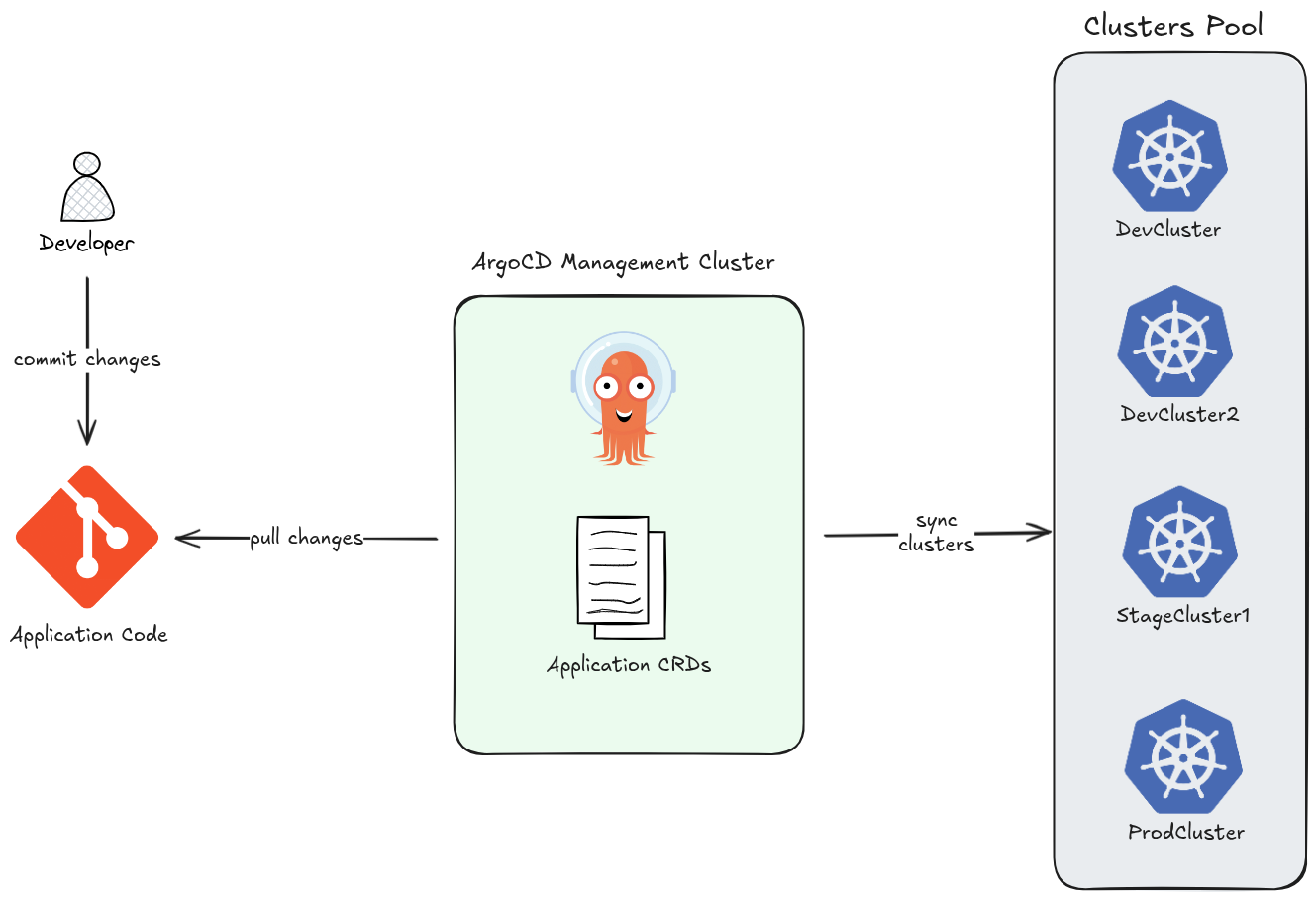
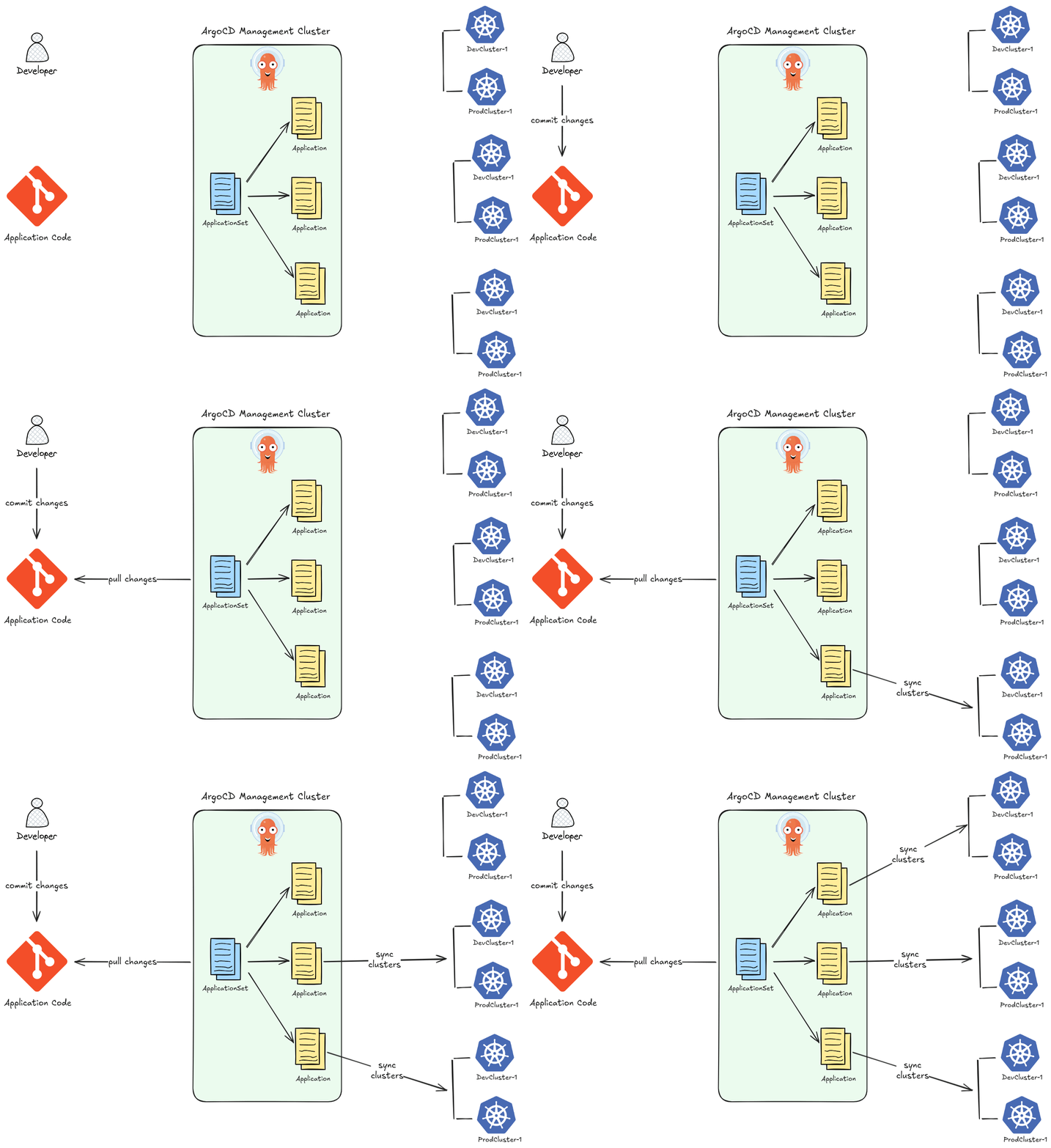
- ApplicationSet — at-scale templating: The ApplicationSet controller lets you generate many ArgoCD Applications from a single template using generators (Git directories, cluster lists, pull requests, etc.). This enables patterns like “deploy this app to every cluster” with a few lines of YAML.
-
Sync Strategies and Hooks: ArgoCD supports fine-grained control over how deployments happen. You can define
PreSync,Sync, andPostSynchooks for complex rollout sequences — enabling blue/green and canary deployments within the GitOps model. -
Manual Sync with Approval Gates: Unlike Flux which leans toward full automation, ArgoCD lets you configure sync to be manual — meaning a human reviews and approves the sync through the UI or CLI before changes land in the cluster. This is valuable in regulated or production-critical environments.
-
Broad Config Management Support: ArgoCD natively supports Kustomize, Helm, Jsonnet, plain YAML directories, and custom plugins — without needing separate controllers for each.
-
SSO and RBAC out of the box: ArgoCD has built-in support for SSO via Auth0, OIDC, KeyCloak, OAuth2, LDAP, SAML 2.0, GitHub Actions, and more. Combined with its RBAC system, it gives platform teams fine-grained access control over who can see and sync what.
Flux vs ArgoCD — Where Each Fits
| Flux | ArgoCD | |
|---|---|---|
| Primary interface | CLI + GitOps | UI + CLI |
| Architecture | Modular controllers | Monolithic application |
| Multi-cluster | Possible but complex | First-class feature |
| Sync control | Automated by default | Automated or manual |
| Image automation | Built-in | Not built-in (separate tooling needed) |
| Scale | Great for edge / constrained clusters | Great for centralized platform teams |
| Learning curve | Lower (YAML-native) | Slightly higher (ArgoCD-specific concepts) |
You typically choose Flux if you want a lightweight, Git-native operator where the cluster manages itself — especially for edge deployments or teams that live entirely in the terminal.
You choose ArgoCD when you need visibility, control, and multi-cluster management — a central dashboard your whole team can use, manual approval gates, and the ability to manage dozens of clusters from one place.